Workspaces are used in Betterview to allow administrators to assign different groups of property profiles to users; users can switch between workspaces as needed.
Adding users
- Select Account, Workspaces.
- From the All workspaces tab, locate the workspace to which you want to add a user.
- Click the Ellipsis button. A menu is displayed.

- Select Add users to workspace. The Add users to workspace dialog is displayed.
- To add a single user:
- Locate the user you want to add. Click the Ellipsis button in that row.
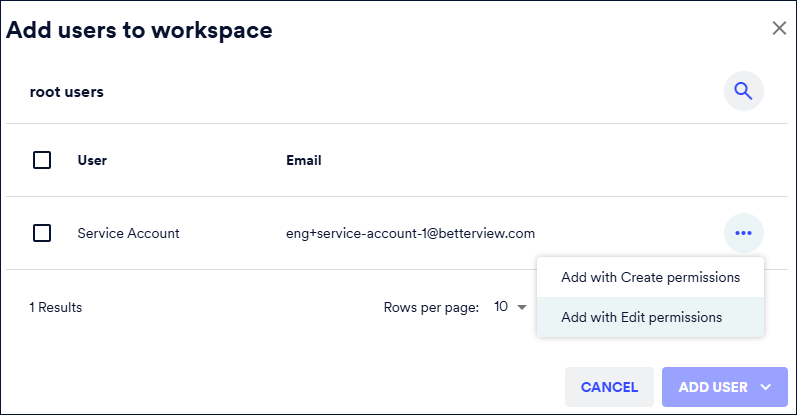
- Select the permission to assign to the user:
- Add with Create permissions - Allows users to create/register new properties within their workspace.
- Add with Edit permissions - Allows users to edit properties that already exist in their workspace.
- To add multiple users:
- Select each user you want to add to the workspace by selecting the check box next to their name.
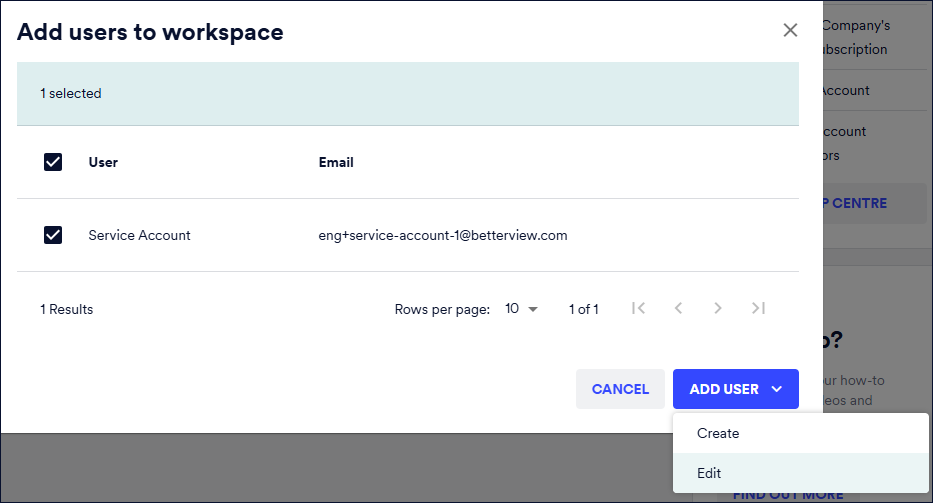
- Click ADD USER. Choose the role (as described above) you want to assign to the selected users. The selected users are added to the workspace.